
Portable CAC reader options have gotten complicated with all the different form factors and connection types flying around.

What Makes a Reader Actually Portable
A lot of readers get called “portable” just because they’re small. But true portability means more than size. You want something that fits in a laptop bag without catching on everything, has a protected card slot so dust and pocket lint don’t wreck the contacts, a durable build that survives being tossed around, no driver installation required so it works on any computer you plug it into, and a cable that won’t turn into a tangled mess after one trip.
I’ve ruined more readers by throwing them loose in a bag than by actual heavy use. The card slot fills up with debris, the cable gets kinked, and suddenly you’re at a conference with a dead reader and no backup. Learn from my mistakes.
The Readers I Actually Recommend
Identiv SCR3500 A (SmartFold)
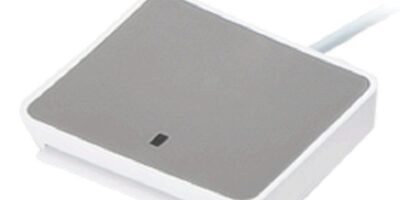
This is the one I carry personally. It folds in half so the card slot is protected when it’s closed. The cable tucks away neatly. It’s CCID compliant so it works on any Windows, Mac, or Linux machine without installing anything. Around $25-35 and worth every penny for how long it lasts on the road.
That’s what makes the SmartFold endearing to us road warriors — it was clearly designed by someone who actually travels with a CAC reader instead of just designing one in a lab.
Identiv SCR3310v2 (the little one)
Not specifically a travel reader, but it’s small enough to work as one. At $15-20 it’s cheap enough that if it breaks mid-trip, you’re not crying about the investment. CCID compliant, universal compatibility. The downside is the card slot is exposed, so wrap it in a cloth or toss it in a ziplock bag when you travel.
Cherry SmartTerminal ST-1144
Super thin profile that slides into a laptop sleeve alongside your computer. Cherry makes solid keyboards and their card reader quality is comparable. CCID compliant, around $25-30. Good cable length for a portable — not so long it tangles, not so short you can’t reach a USB port on the far side of a laptop.
ACS ACR39U-N1
Budget travel option. Compact, lightweight, CCID compliant, and cheap enough to be disposable. Under $20. Build quality is a step below the others on this list, but it gets the job done if you’re watching your wallet.
The USB-C Situation
Probably should have led with this section, honestly. If your laptop only has USB-C ports — and most newer ones do — you’ve got two options. Identiv now makes a USB-C version of the SCR3310v2, which is the cleanest solution. No adapter, no extra parts to lose. Or you can pair any USB-A reader with a USB-C adapter. Just get a decent adapter — the $3 ones sometimes don’t deliver enough power to the reader, and you’ll chase a “device not recognized” error for an hour before figuring out it’s the adapter, not the reader.
Mobile Device Readers
Some portable readers work with phones and tablets. Identiv makes a Lightning version for iPhones that works with DoD-approved iOS apps. USB-C readers can work with some Android devices too, but app support is hit or miss. Don’t count on mobile CAC access for mission-critical stuff unless you’ve tested it thoroughly with your specific device and the specific app you need.
Travel Tips From Hard Experience
Test your reader on the laptop you’re actually bringing before you leave. Sounds obvious, but I’ve seen people grab a reader from their desk, pack a different laptop, and discover at the hotel that the drivers aren’t set up. Verify your CAC certificates aren’t about to expire mid-trip — check the expiration dates in your certificate manager. Know your PIN, obviously, and never store it with your card or in your phone.
Pack your reader in your carry-on. If your checked bag gets lost, you can still work. Use a VPN for any DoD access over hotel or public Wi-Fi. Better yet, use a mobile hotspot instead of hotel Wi-Fi entirely — hotel networks are sketchy from a security standpoint. And remove your CAC from the reader when you’re not actively using it. Don’t leave it sitting in a reader at a hotel business center while you go grab food.
For international travel, check whether your destination has restrictions on importing cryptographic devices. It’s rare, but some countries technically require import declarations for smart card readers. And inform your security office before traveling internationally — they may have specific guidance for your situation.

Subscribe for Updates
Get the latest cac readers.com updates delivered to your inbox.
We respect your privacy. Unsubscribe anytime.