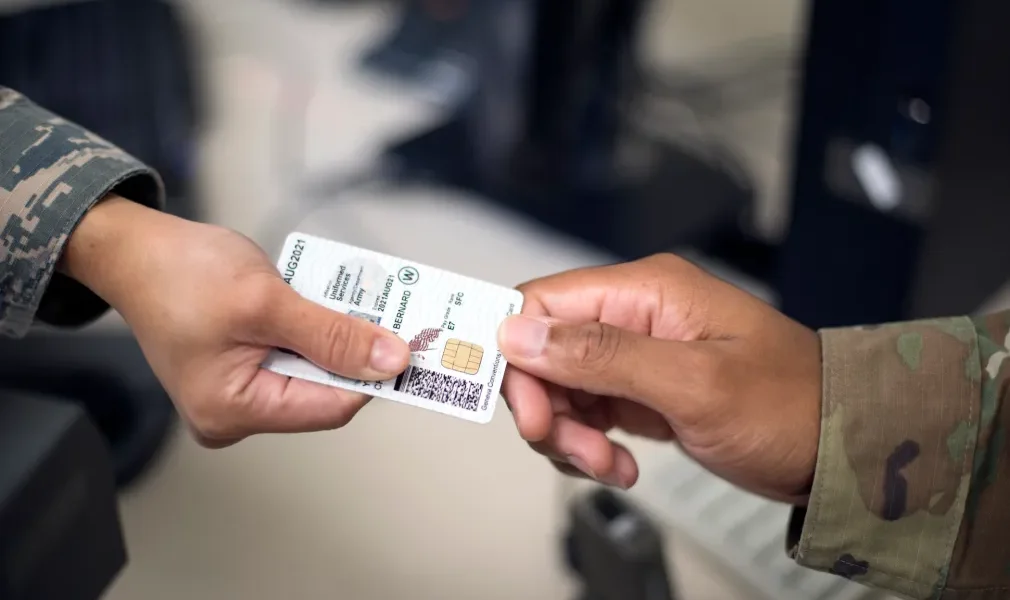
For most CAC users, the best reader is a simple USB CCID device that matches the computer’s physical port and is supported by the operating system. Current models to compare include the IOGEAR GSR202 for USB-A, IOGEAR GSR205 for USB-C, HID OMNIKEY 3121 for a stable desktop reader, and ACS ACR39U-U1 as another standards-based USB option.
This guide is based on current manufacturer specifications and safe compatibility checks. We did not laboratory-test every reader, and a product being marketed for CAC use or marked TAA compliant does not mean the Department of Defense universally approves it for every device, network or organization.
Quick recommendations
| Reader | Best fit | Important limitation |
|---|---|---|
| IOGEAR GSR202 | Computers with a full-size USB-A port | Not appropriate for a USB-C-only laptop without a compatible adapter |
| IOGEAR GSR205 | Modern laptops and tablets with USB-C host support | A USB-C-shaped port alone does not guarantee every device or mobile app supports CAC login |
| HID OMNIKEY 3121 | A weighted desktop reader that stays in place | Larger than a travel reader; verify the current operating-system driver path |
| ACS ACR39U-U1 | A compact PC/SC and CCID-compatible USB reader | Connector and regional model variants can differ |
None is automatically “more secure” merely because its enclosure looks rugged or a listing uses military imagery. The CAC, certificate chain, operating system, middleware, browser and destination website all participate in authentication. The reader is only one link in that path.
Best USB-A CAC reader: IOGEAR GSR202
IOGEAR currently lists the GSR202 as a USB-A CAC reader and describes it as TAA compliant. It is the straightforward choice when your Windows, Mac or Linux computer has a conventional rectangular USB-A port and you want a dedicated contact smart-card slot.
TAA compliance concerns procurement and country-of-origin requirements; it is not the same thing as a blanket DoD endorsement, an authority-to-operate decision, or proof that every military website will work. Confirm the exact computer, operating-system version and organization policy before purchase.
Best USB-C CAC reader: IOGEAR GSR205
IOGEAR currently lists the GSR205 as a USB-C CAC reader and TAA compliant. Choosing a native USB-C reader avoids an extra adapter on many newer laptops. That reduces physical clutter and one possible connection failure.
USB-C describes a connector, not an authentication guarantee. Some tablets and phones have USB-C but do not expose the reader to applications in the same way as a desktop operating system. Mobile CAC use may require an approved reader, app, middleware or organizational workflow. Check your service desk’s current guidance rather than assuming a reader that works on a laptop will work on a phone.
Best stationary reader: HID OMNIKEY 3121
The OMNIKEY 3121 is a full-size desktop contact smart-card reader with a broad base. That form factor is useful on a permanent desk because inserting and removing a card is less likely to drag the reader around. HID positions the OMNIKEY family for standards-based smart-card applications.
It is less convenient for travel than a small cable reader. Check the manufacturer’s current downloads and operating-system compatibility for the precise part number before buying used or old stock. Product names can persist longer than driver support.
Compact standards-based alternative: ACS ACR39U-U1
ACS publishes PC/SC, CCID and ISO 7816 support for the ACR39U-U1 family. Those are useful compatibility signals for contact smart cards. The model is worth comparing when you want a compact USB reader and prefer a manufacturer with detailed technical documentation.
ACS sells variants with different connectors and housings. Match the complete model number, not just “ACR39,” and verify that the vendor’s current driver or native operating-system support covers your computer.
What to check before buying
1. Physical port
Look at the computer, not just its product family. USB-A is the larger rectangular connector; USB-C is the smaller reversible connector. Avoid a chain of low-quality hubs and adapters, especially when troubleshooting intermittent detection.
2. CCID and PC/SC support
CCID is a common USB smart-card reader interface, while PC/SC is an application interface used by operating systems and software. A standards-based reader is generally easier to support than a proprietary device requiring abandoned software. These labels still do not guarantee access to a particular site.
3. Operating-system version
“Works with Windows” is too vague. Verify Windows 11 rather than an old Windows release, and confirm the current macOS or Linux version where relevant. Some readers use an operating system’s built-in CCID driver; others have vendor packages for specific functions.
4. Your organization’s instructions
Government agencies, contractors and military units can impose different endpoint-management and software rules. Managed devices may block driver installation or external hardware. The local help desk or published remote-access guide controls, even if a retail listing says “military compatible.”
5. Seller and model authenticity
Buy from the manufacturer or a reputable seller that identifies the exact model number and return policy. Marketplace listings often combine reviews across variants or reuse “CAC reader” in the title without documenting CCID, operating-system support or warranty.
Claims that should not drive the purchase
- “Military-grade.” This is often marketing language with no identified test standard.
- “DoD approved.” Ask for the specific approval list, authority and model number. TAA compliance alone does not establish this claim.
- “Encrypted reader.” Authentication security is not established by an unexplained retail phrase. Use supported government websites and approved software.
- “Plug and play everywhere.” Reader detection, certificate selection and website authentication are separate stages.
- “No middleware ever needed.” Requirements vary by operating system, certificate and destination service.
Reader detected, but CAC login still fails?
Do not immediately buy another reader. Work through the failure in layers:
- Confirm the reader appears in Device Manager, System Information or the appropriate USB hardware view.
- Insert the CAC fully and check whether the operating system detects a smart card.
- Test another USB port without a hub.
- Restart the browser and verify the correct certificate is selected.
- Check date, time and current government certificate requirements.
- Try the organization’s official test or remote-access instructions.
- Contact the responsible help desk before installing untrusted middleware or certificate bundles.
Our CAC reader troubleshooting checklist separates hardware detection, card recognition, certificates and website problems. If Windows will not install or identify the device, use the Windows 11 CAC reader driver guide.
Security practices
- Use only official government or organizational login pages.
- Do not enter a CAC PIN into a third-party web form, shopping-page utility or unknown pop-up.
- Do not download “CAC fixes,” middleware or root certificates from unverified file-sharing sites.
- Remove the CAC when it is not actively needed and follow local physical-security rules.
- Keep the operating system and browser updated through approved channels.
- Report a lost card, suspicious PIN prompt or suspected credential exposure through official procedures.
Frequently asked questions
Does any USB smart-card reader work with a CAC?
No. The reader needs compatible contact-card protocols and operating-system support. Even a compatible reader does not guarantee that a particular website, certificate or managed device will work.
Is TAA compliant the same as DoD approved?
No. TAA is a federal procurement-origin requirement. It does not by itself prove universal DoD approval, cybersecurity authorization or compatibility with every military system.
Should I buy USB-A or USB-C?
Choose the connector your computer natively provides. A reliable adapter can work, but a native connection removes one troubleshooting variable.
Do Macs need a special CAC reader?
Not necessarily. Many standards-based USB readers can be recognized by macOS, but website, certificate and middleware requirements vary. Verify the current macOS version and your organization’s instructions.
Are Bluetooth CAC readers better?
They solve different mobile-use cases and introduce device, app, pairing and policy requirements. Read our Bluetooth CAC compatibility and approval guide before purchasing one.
Manufacturer listings and compatibility guidance checked in August 2026. Verify the exact model and your organization’s current requirements before purchase.
New to the hardware? Start with our beginner CAC reader setup and home-use guide before choosing middleware or changing drivers.


Subscribe for Updates
Get the latest cac readers.com updates delivered to your inbox.
We respect your privacy. Unsubscribe anytime.