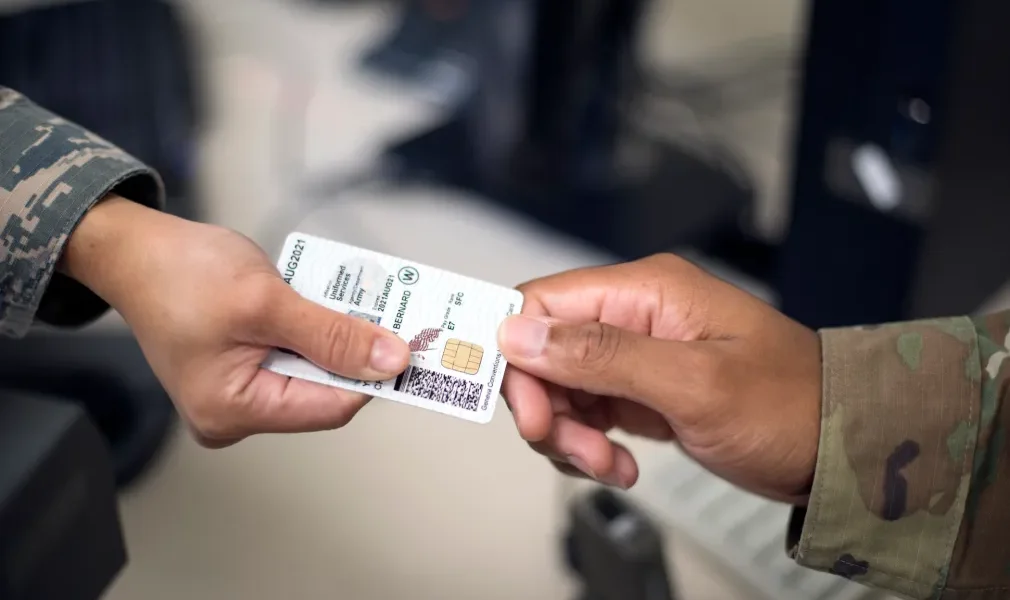
GPC-Approved CAC Equipment: Complete Amazon Shopping List 2025
Buying CAC equipment with a Government Purchase Card has gotten complicated with all the procurement rules and product options flying around. As someone who’s helped dozens of offices set up telework stations and navigate the GPC approval process, I learned everything there is to know about what to buy, where to buy it, and how to justify it so your approving official doesn’t kick it back. Today, I will share it all with you.
Every product in this guide has been verified for availability, reviewed for government use, and organized with actual justification language you can copy-paste into your purchase request. I got tired of watching people spend hours researching what they could just buy and be done with, so here’s the definitive list.
How to Use This Shopping List with Your GPC
Before You Purchase:
Probably should have led with this section, honestly. Don’t skip this part or you’ll end up with a purchase that gets flagged during reconciliation.
- Verify Your GPC Limits: Check your single purchase limit — typically $2,500-$5,000 depending on your agency
- Get Supervisor Approval: For purchases over your local threshold (often $500-$1,000), get it in writing first
- Confirm Budget: Make sure funds are actually available in your org’s budget line
- Use the Justification Templates Below: They’re written to satisfy most approving officials
- Save Everything: Order confirmation, receipt, delivery proof — all of it
- Reconcile Within 5 Business Days: Don’t let this slide or your card gets flagged
Amazon Business vs Regular Amazon:
Amazon Business (Preferred):
- Government pricing and quantity discounts
- Tax-exempt purchases when configured properly
- Purchase order integration
- Spending analytics that make reconciliation easier
- Multi-user approval workflows
Regular Amazon (Acceptable if your org doesn’t have Business):
- Still approved for GPC purchases at most agencies
- Ship to your government address
- Save detailed receipts for your records
Ask your Agency Program Coordinator if your org has Amazon Business access. Most do at this point.
Category 1: CAC Card Readers (Mission Critical)
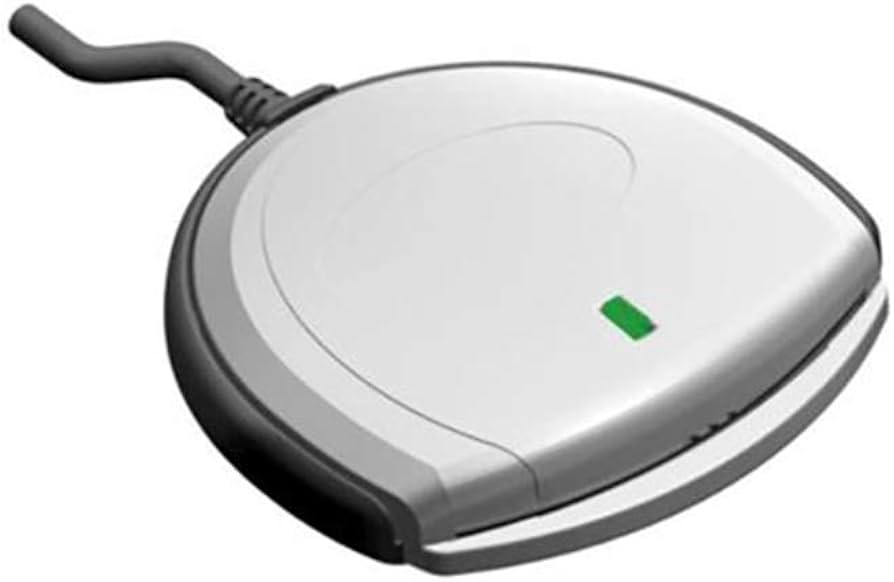
That’s what makes CAC readers endearing to us procurement folks — they’re cheap, essential, and universally approved. This is the single easiest GPC purchase you’ll ever make.
Premium Option: TAA Compliant (Government-Grade)
IOGEAR USB-C CAC Smart Card Reader GSR205
Price Range: $35-45
TAA Compliant: Yes (approved for DoD purchases)
Compatibility: Windows 10/11, macOS 10.12+, ChromeOS
Warranty: 3-year + lifetime support
Best For: Government employees with USB-C laptops (Dell Latitude, Lenovo ThinkPad, MacBook)
Budget Option: Standard CAC Reader
SAICOO Smart Card Reader (USB-A Horizontal)
Price Range: $15-20
TAA Compliant: No
Compatibility: Windows 10/11, USB-A ports
Warranty: 18-month
Best For: Budget-conscious purchases, older laptops with USB-A ports
Ultra-Portable Option: Travel CAC Reader
Foldable USB-C CAC Reader (Keychain Size)
Price Range: $10-15
Portability: Thumb-drive size, folds flat, keychain attachment
Compatibility: USB-C devices (MacBook, modern laptops)
Best For: Frequent travelers, field personnel, backup reader
Multi-Function Option: 5-in-1 Card Reader
5-in-1 CAC Smart Card Reader with USB-C Adapter
Price Range: $12-18
Features: Reads CAC + SIM/SD/TF cards, foldable design
Compatibility: USB-A + includes USB-C adapter
Best For: Users who also need SD card reader for cameras/phones
GPC Purchase Justification — CAC Readers:
Sample Language for Your Approval Request:
“Requesting approval to purchase CAC card reader ($35-45) to enable secure remote access to government email systems and DoD web portals from telework location. This equipment is essential for maintaining operational continuity and accessing Common Access Card-authenticated systems including Outlook Web Access (webmail.apps.mil), MyPay, AFMS, and other mission-critical .mil domains. CAC reader enables compliance with DoDI 8520.03 (Identity Authentication for Information Systems) while working remotely under approved telework agreement. Product is TAA compliant and meets DoD cybersecurity requirements for PKI authentication devices.”
Estimated Cost: $10-45 (well within micro-purchase threshold)
Category 2: USB Hubs & Docking Stations
If your laptop has two USB ports and you need to connect a reader, monitor, keyboard, mouse, and ethernet, you need a dock. It’s not optional — it’s basic infrastructure for a functional workstation.
Premium Docking Station: Multi-Display Support
LIONWEI 13-in-1 USB-C Docking Station
Price Range: $100-150
Features:
- Triple display support (2x HDMI + laptop screen)
- 8 USB ports (4x USB-A 3.0, 2x USB-C, 2x USB-A 2.0)
- Gigabit Ethernet port
- 100W Power Delivery (charges laptop while working)
- SD/TF card readers
- 3.5mm audio jack
Compatible: MacBook Pro/Air, Dell Latitude, HP EliteBook, Lenovo ThinkPad, Microsoft Surface
Alternative Premium: Selore 14-in-1
Selore 14-in-1 USB-C Docking Station
Price Range: $120-170
Features: 2x HDMI + VGA, 10Gbps USB ports, 100W PD, 6 USB ports total
Best For: Offices that still have legacy VGA monitors or projectors
Professional Grade: Plugable Triple Display Dock
Plugable USB-C Triple Display Docking Station
Price Range: $200-250
Features: 3x HDMI outputs, 6x USB 5Gbps ports, 100W Power Delivery
Compatibility: Windows, macOS, ChromeOS
Best For: Data analysts, engineers, anyone who needs 3 external monitors
Budget Option: Simple USB Hub
Amazon Basics USB 3.2 Gen 2 Hub
Price Range: $20-30
Features: 10Gbps speed, USB-C to 1x USB-C + 3x USB-A, compact
Best For: Simple peripheral expansion without video or power delivery
GPC Purchase Justification — Docking Stations:
“Requesting approval to purchase USB-C docking station ($100-250) to establish ergonomic and productive telework workstation. Docking station enables connection of external monitors (for improved productivity with multiple windows/applications), wired Ethernet (for stable VPN connection to government networks), external keyboard/mouse (ergonomic compliance), and CAC reader (secure authentication). Single-cable connectivity reduces wear on laptop USB ports and streamlines daily setup/teardown. Investment supports telework infrastructure and reduces strain-related workplace injuries by enabling proper ergonomic configuration per OSHA guidelines.”
Estimated Cost: $20-250 depending on features needed
Category 3: External Monitors
Every study on the topic shows dual monitors boost productivity by 20-30% for knowledge workers. If you’re writing reports, analyzing data, or managing multiple systems simultaneously — which is basically everyone in a government office — a second monitor pays for itself in the first week.
Standard 24″ Monitor Specs to Look For:
- Resolution: 1920×1080 (Full HD) minimum
- Panel Type: IPS for best viewing angles
- Refresh Rate: 60Hz or 75Hz (don’t need gaming speed)
- Connectivity: HDMI + DisplayPort
- Adjustable Stand: Height, tilt, swivel
- VESA Mount: 100x100mm if you want a monitor arm later
Recommended 24″ Models ($120-200 each):
- Dell P2422H: Adjustable stand, 3-year warranty — the office workhorse ($150-180)
- HP 24mh: Ultra-slim bezels, HDMI+VGA for older systems ($130-160)
- LG 24MK430H: Affordable IPS, gets the job done ($120-150)
- BenQ GW2480: Eye care technology, flicker-free — good for long days ($140-170)
Larger 27″ Monitors ($200-350 each):
Worth the upgrade if you’re doing data analysis, spreadsheets, or CAD work. QHD (2560×1440) resolution is the sweet spot — noticeably sharper than 1080p without the cost of 4K.
- Dell S2722DC: 27″ QHD with built-in USB-C hub — charges your laptop too ($280-320)
- LG 27UP550: 27″ 4K, HDR10, excellent color accuracy ($300-350)
- BenQ GW2780: 27″ FHD, budget-friendly if you don’t need QHD ($200-240)
GPC Justification — Monitors:
“Requesting approval to purchase external monitor(s) ($120-350 per unit) to enhance productivity in telework environment. Research demonstrates dual-monitor configurations increase productivity by 20-30% for knowledge workers performing data analysis, document preparation, and multi-application workflows. External display enables simultaneous viewing of reference materials and work product, reducing time spent switching between windows and improving accuracy. Monitor supports ergonomic workstation setup by allowing laptop to be elevated to eye level while using external display as primary screen. Equipment directly supports mission requirements for [specific job duties: report writing, data analysis, presentation development, etc.].”
Estimated Cost: $120-350 per monitor (dual setup: $240-700)
Category 4: Keyboards & Mice
If you’re typing 8+ hours a day on a laptop keyboard, your wrists are going to hate you eventually. An external keyboard and mouse aren’t luxury items — they’re ergonomic necessities that your agency should be happy to fund.
Keyboard Recommendations:
Budget Wireless:
- Logitech K270: Full-size with numpad, quiet keys ($18-25)
- Amazon Basics Wireless Keyboard: Reliable and cheap ($15-22)
Ergonomic (worth the extra money):
- Microsoft Ergonomic Keyboard: Split layout, cushioned palm rest ($45-60)
- Logitech ERGO K860: Split curved design, excellent wrist rest ($90-130)
- Kensington Pro Fit Ergo: Split keyboard, adjustable angle ($50-70)
Professional Mechanical:
- Keychron K2: Compact mechanical, works on Mac and Windows, Bluetooth ($70-90)
- Logitech MX Keys: Backlit, low-profile, connects to multiple devices ($90-120)
Mouse Recommendations:
Budget Wireless:
- Logitech M510: Side buttons, long battery life ($18-25)
- Amazon Basics Wireless Mouse: Simple and reliable ($10-15)
Ergonomic:
- Logitech MX Vertical: Vertical design reduces wrist strain significantly ($80-110)
- Anker Vertical Mouse: Budget vertical option ($20-30)
- Logitech MX Master 3S: Premium ergonomic, customizable — my personal favorite ($90-120)
Trackball (great for limited desk space):
- Logitech Ergo M575: Wireless trackball, comfortable angle ($40-50)
- Kensington Expert Trackball: Large ball, precision tracking ($80-110)
Keyboard + Mouse Combos:
- Logitech MK270: Wireless combo, best bang for buck ($25-35)
- Microsoft Bluetooth Desktop: Clean setup, Bluetooth ($50-70)
- Logitech MK850 Performance: Multi-device support ($80-100)
GPC Justification — Keyboards & Mice:
“Requesting approval to purchase ergonomic keyboard and mouse ($25-130) to prevent repetitive strain injuries (RSI) and comply with ergonomic workplace standards. External input devices enable proper workstation setup with laptop elevated to eye level (reducing neck strain) while maintaining comfortable typing position. Ergonomic design reduces risk of carpal tunnel syndrome and tendonitis associated with prolonged laptop keyboard/trackpad use. Equipment supports employee health and reduces potential workers’ compensation claims related to repetitive motion injuries. OSHA recommends ergonomic equipment for employees working extended periods at computer workstations.”
Estimated Cost: $25-130 for keyboard + mouse
Category 5: Webcams
With everyone on Teams and Zoom these days, a decent webcam makes a real difference in how professional you come across to leadership and external stakeholders.
Standard 1080p Webcams:
- Logitech C920x HD Pro: The standard. Autofocus, stereo audio, reliable ($60-80)
- NexiGo N960E: Privacy cover built in, dual mics ($40-55)
- Anker PowerConf C200: AI-powered framing, good value ($50-65)
Premium 4K Webcams:
- Logitech Brio 4K: 4K 30fps or 1080p 60fps, HDR, RightLight 3 ($150-200)
- Razer Kiyo Pro: 1080p 60fps, wide field of view, excellent low-light ($130-170)
Budget Webcams:
- Amazon Basics USB Webcam: 720p, gets the job done ($25-35)
- Logitech C270: 720p, budget-friendly classic ($25-35)
GPC Justification — Webcams:
“Requesting approval to purchase HD webcam ($40-200) to enable professional video conferencing for telework. Webcam is essential for participation in Microsoft Teams meetings, stakeholder briefings, virtual training sessions, and collaborative work sessions. Laptop built-in cameras often provide inadequate video quality and unflattering angles, reducing professional appearance in meetings with senior leadership and external partners. External webcam enables proper eye-level positioning and superior image quality, supporting effective remote communication and collaboration. Equipment directly supports agency telework policy and distributed workforce requirements.”
Estimated Cost: $25-200 depending on quality
Category 6: Cables & Adapters
The unglamorous stuff that makes everything else work. Don’t cheap out on cables — a flaky HDMI cable will waste more of your time troubleshooting than it saves in purchase price.
HDMI Cables:
- Amazon Basics High-Speed HDMI: 6ft, 4K support ($7-10)
- UGREEN HDMI Cable: 10ft, braided, 4K 60Hz ($10-15)
- Cable Matters HDMI 2.1: 6ft, 8K support, future-proof ($12-18)
USB-C Cables:
- Anker USB-C to USB-C: 6ft, 100W charging, 10Gbps data ($12-18)
- Cable Matters USB-C: 10ft, Thunderbolt 4 certified ($20-30)
- Amazon Basics USB-C: 6ft, budget option ($8-12)
DisplayPort Cables:
- Cable Matters DisplayPort: 6ft, 4K 60Hz ($10-15)
- VESA Certified DP Cable: 10ft, 8K support ($15-22)
Ethernet Cables:
- Amazon Basics Cat 6: 25ft, gigabit speed ($10-15)
- Cable Matters Cat 6: 50ft, snagless connectors ($12-18)
- Monoprice Cat 6A: 25ft, 10Gbps support ($15-20)
USB-A to USB-C Adapters:
- Anker USB-C Adapter (2-pack): Data + charging ($10-15)
- UGREEN USB-C Adapter: Aluminum, 10Gbps ($8-12)
GPC Justification — Cables:
“Requesting approval to purchase connectivity cables ($7-30) to establish functional telework workstation. Cables are essential infrastructure for connecting external monitors (HDMI/DisplayPort), wired Ethernet for stable VPN connection to government networks, and USB-C charging for laptop power delivery. Wired connections provide superior reliability compared to wireless alternatives, reducing connectivity interruptions during mission-critical work. Equipment enables proper cable management and professional workstation appearance.”
Estimated Cost: $30-80 for a complete cable kit
Category 7: Ergonomic Accessories
This is where OSHA compliance works in your favor. Your agency has a vested interest in preventing workplace injuries, and ergonomic accessories directly support that goal. These are usually easy approvals.
Monitor Arms & Stands:
- Amazon Basics Single Monitor Arm: VESA mount, fully adjustable ($80-120)
- VIVO Dual Monitor Desk Mount: Handles 2 monitors, full motion ($60-90)
- ErGear Monitor Stand: Gas spring, fits 17-32″ monitors ($90-130)
- Simple Monitor Riser: Elevates screen, storage underneath ($20-40)
Laptop Stands:
- Rain Design mStand: Aluminum, elevates to eye level ($40-60)
- Nulaxy Laptop Stand: Adjustable height and angle, portable ($25-40)
- Amazon Basics Ventilated Laptop Stand: Mesh platform with cooling ($20-30)
Footrests:
- AmazonBasics Footrest: Adjustable angle, textured surface ($25-35)
- Humanscale Foot Rocker: Active footrest, promotes movement ($90-120)
- Kensington SoleMate: Adjustable height and tilt ($30-45)
Wrist Rests:
- 3M Gel Wrist Rest: Antimicrobial, soft gel ($15-22)
- Gimars Memory Foam Wrist Rest: Keyboard + mouse set ($12-18)
Desk Lamps:
- BenQ ScreenBar: Monitor-mounted, auto-dimming — I use one of these and it’s great ($100-130)
- TaoTronics LED Desk Lamp: Adjustable arm, USB charging port ($35-50)
- Amazon Basics LED Desk Lamp: Dimmable, touch control ($25-35)
GPC Justification — Ergonomic Accessories:
“Requesting approval to purchase ergonomic accessories ($20-130) to establish OSHA-compliant telework workstation. Monitor arms enable proper screen positioning at eye level (reducing neck and shoulder strain), laptop stands allow use of external keyboard while maintaining ergonomic screen height, and footrests support proper seated posture per ANSI/HFES 100 ergonomic standards. These accessories prevent musculoskeletal disorders (MSDs) associated with prolonged computer work, reducing risk of workers’ compensation claims and lost productivity due to workplace injuries. Investment in ergonomic equipment demonstrates agency commitment to employee health and safety.”
Estimated Cost: $20-130 per accessory
Category 8: Power & Surge Protection
Protecting government equipment from power surges is a no-brainer purchase justification. A $30 surge protector protecting a $1,500 laptop is the easiest approval you’ll ever write.
Surge Protectors:
- APC 11-Outlet Surge Protector: 2880J protection, 8ft cord ($30-45)
- Belkin 12-Outlet Pivot-Plug: 4320J, rotating outlets ($40-55)
- Amazon Basics 6-Outlet: 790J, budget option ($12-18)
UPS Battery Backup:
- APC Back-UPS 600VA: Battery backup, 7 outlets ($70-100)
- CyberPower 850VA: LCD display, AVR, battery backup ($100-140)
- AmazonBasics Standby UPS 800VA: 12 outlets ($110-150)
Power Strips with USB:
- Anker Power Strip: 12 outlets + 3 USB ports ($35-50)
- BESTEK Power Strip Tower: 12 AC + 5 USB, vertical design ($30-45)
GPC Justification — Power Protection:
“Requesting approval to purchase surge protector / UPS battery backup ($12-150) to protect government equipment and ensure uninterrupted workflow during power fluctuations. Surge protection prevents damage to laptop, monitors, docking station, and peripherals from electrical spikes, protecting government property investment. UPS battery backup provides graceful shutdown capability during power outages, preventing data loss and file corruption during active work on government documents and systems. Equipment protects both government property and work product.”
Estimated Cost: $12-150 depending on protection level
Category 9: Office Supplies
Standard stuff that every teleworker needs. Usually gets zero pushback from approving officials.
Paper Products:
- Copy Paper: Amazon Basics 8.5×11″ white, 5 reams ($25-35)
- Notepads: Legal pads, notebooks, sticky notes ($10-25)
- Index Cards: 3×5″ or 4×6″ ($5-12)
Writing Instruments:
- Pens: Pilot G2 gel pens, 12-pack ($10-18)
- Pencils: Ticonderoga #2, 96-pack ($15-22)
- Highlighters: Sharpie assorted colors ($8-15)
- Dry Erase Markers: Expo low-odor, 12-pack ($12-18)
Desk Organization:
- File Folders: Manila or colored, letter size, 100-pack ($15-25)
- Binders: 1″ or 2″ 3-ring, 6-pack ($15-30)
- Desk Organizer: Pen holder, paper tray ($15-35)
- File Boxes: Bankers boxes ($20-40)
Basic Supplies:
- Staplers: Swingline standard + staples ($12-20)
- Tape: Scotch transparent, dispenser + refills ($8-15)
- Scissors: Office scissors, 8″ ($5-10)
- Paper Clips & Binder Clips: Assorted sizes ($8-15)
Estimated Cost: $100-300 for a complete supply kit
Pre-Built Telework Packages
Here are three ready-made equipment lists at different budget levels, all within typical GPC limits. Pick the one that matches your budget and adjust as needed.
Budget Package (~$375)
| Item | Product | Price |
|---|---|---|
| CAC Reader | SAICOO USB-A Smart Card Reader | $18 |
| USB Hub | Amazon Basics USB 3.2 Hub | $25 |
| Monitor | 24″ LG 1080p IPS | $140 |
| Keyboard + Mouse | Logitech MK270 Combo | $30 |
| Webcam | NexiGo 1080p | $50 |
| Monitor Stand | Basic monitor riser | $25 |
| Cables | HDMI + Ethernet cables | $20 |
| Surge Protector | Amazon Basics 6-outlet | $15 |
| Office Supplies | Basic starter kit | $50 |
Total: ~$373 — well within Level 1 GPC limit ($2,500)
Standard Package (~$1,200)
| Item | Product | Price |
|---|---|---|
| CAC Reader | IOGEAR USB-C TAA Compliant | $40 |
| Docking Station | LIONWEI 13-in-1 USB-C Dock | $130 |
| Dual Monitors | 2x Dell P2422H 24″ | $340 |
| Monitor Arms | VIVO Dual Monitor Desk Mount | $75 |
| Keyboard | Microsoft Ergonomic Keyboard | $55 |
| Mouse | Logitech MX Vertical Ergonomic | $95 |
| Webcam | Logitech C920x HD Pro | $70 |
| Laptop Stand | Nulaxy Adjustable Stand | $35 |
| Footrest | AmazonBasics Adjustable Footrest | $30 |
| Desk Lamp | TaoTronics LED | $45 |
| Cables | HDMI, USB-C, Ethernet kit | $60 |
| UPS Battery Backup | APC Back-UPS 600VA | $85 |
| Office Supplies | Complete starter kit | $150 |
Total: ~$1,210 — within Level 1-2 GPC limits
Premium Package (~$2,170)
| Item | Product | Price |
|---|---|---|
| CAC Reader | IOGEAR USB-C TAA Compliant | $40 |
| Backup CAC Reader | Portable USB-C Foldable | $13 |
| Docking Station | Plugable Triple Display Dock | $230 |
| Primary Monitors | 2x Dell S2722DC 27″ QHD | $600 |
| Monitor Arms | ErGear Dual (gas spring) | $180 |
| Keyboard | Logitech MX Keys | $110 |
| Mouse | Logitech MX Master 3S | $105 |
| Webcam | Logitech Brio 4K | $180 |
| Laptop Stand | Rain Design mStand | $55 |
| Ergonomic Footrest | Humanscale Foot Rocker | $110 |
| Desk Lamp | BenQ ScreenBar | $120 |
| Cables Premium Kit | Thunderbolt 4, HDMI 2.1, Cat 6A | $100 |
| UPS Battery Backup | CyberPower 850VA LCD | $125 |
| Office Supplies | Premium + organization | $200 |
Total: ~$2,168 — within Level 2 GPC limit ($5,000)
GPC Purchase Process: Step by Step
The Week Before:
- Draft your equipment list using the packages above as a starting point
- Verify products are still available on Amazon at listed prices
- Write up your justification using the templates in this guide
- Get supervisor pre-approval via email with your justification and estimated total
- Confirm budget availability with your resource manager
Day of Purchase:
- Log into Amazon Business (or regular Amazon)
- Add items to cart, double-checking part numbers and quantities
- Review the total — make sure it’s within your GPC limit
- Select shipping to your government facility or approved telework address
- Enter GPC card info and add cost center or project code if required
- Place order
- Save the order confirmation — screenshot and PDF both
- Download and save the itemized receipt from Amazon order history
After Delivery:
- Inspect everything — make sure you got the right products
- Test all equipment to confirm it works
- Save delivery confirmation with tracking showing delivery date
- Reconcile in your GPC system within 5 business days: upload receipt, add accounting codes, add justification notes, submit for approval
- If any items are over $500, add to property inventory per agency policy
Common GPC Mistakes to Avoid
Split purchases: Buying $3,000 worth of gear as three separate $1,000 orders to dodge the approval threshold is prohibited under the FAR. It can get your card suspended or worse. Submit one purchase with proper documentation.
Personal use equipment: Everything you buy with a GPC is government property for official use only. Don’t try to justify equipment that’s “mostly for work but also personal.”
Wrong shipping address: Ship to your government facility or your approved telework address with documentation. Random home address without a telework agreement on file will raise flags.
Missing documentation: Save everything: order confirmation, itemized receipt, delivery tracking, and the approval email chain. Missing any of these causes headaches during audits.
No justification on file: Always have written justification before you purchase. The templates in this guide are a good starting point — customize them with your specific job duties and mission requirements.
Frequently Asked Questions
Can I buy equipment for my home office with GPC?
Yes, if you have an approved telework agreement and the equipment is for official government use only. The equipment remains government property and may need to be returned when you leave the position or telework ends.
Do I need competitive quotes for Amazon purchases?
Generally no for micro-purchases under $10,000. But it’s smart to quickly check 1-2 other sources (GSA Advantage, CDW-G) to document that Amazon pricing is competitive. Takes five minutes and covers you during audits.
What if I need equipment over my GPC limit?
Contact your Agency Program Coordinator about a temporary limit increase. Or work with your contracting office for purchases over $10,000. You can also split items across multiple cardholders — that’s different from split purchasing by the same cardholder, which is prohibited.
Can I return GPC items?
Yes, process returns through Amazon normally. The credit appears on your GPC statement within 5-10 business days. Document the return reason and credit in your GPC system.
Are refurbished items allowed?
Check your agency policy. Most allow “manufacturer refurbished” or “Amazon Renewed” but some prohibit third-party refurbished equipment.
How do I handle sales tax?
Federal government purchases are tax-exempt. Make sure your Amazon Business account has tax-exempt status configured. If you get charged tax in error, contact Amazon for a refund with your agency’s tax-exempt documentation.
Bottom Line
Setting up a proper telework station through GPC doesn’t have to be a procurement nightmare. Pick a budget tier from the packages above, grab the justification templates, get your supervisor’s okay, and order it all in one clean purchase. The equipment pays for itself in productivity gains and prevents the ergonomic injuries that cost the government way more in the long run.
Always follow your agency’s specific GPC policies, get proper approvals, document everything, and reconcile within the required timeframe. When in doubt, ask your Agency Program Coordinator before clicking “Place Order.”
Related Guides
- What Can You Buy on Amazon with a Government Purchase Card? Complete 2025 Guide
- Dell Latitude CAC Setup Guide 2025
- Lenovo ThinkPad CAC Configuration Guide
- MacBook Pro CAC Setup 2025: USB-C Reader Guide
- Best CAC Card Readers 2025: TAA Compliant Options
Contains affiliate links. As an Amazon Associate, we earn from qualifying purchases at no cost to you or the government.
Disclaimer: This guide provides general information about GPC-eligible purchases. Always consult your agency’s specific GPC policies, your Agency Program Coordinator, and your supervisor before making purchases. GPC policies and purchase limits vary by agency. Prices are estimates and may vary. All Amazon links verified as of October 2025.



Subscribe for Updates
Get the latest articles delivered to your inbox.
We respect your privacy. Unsubscribe anytime.